Best Ping Pong Ball Launcher for Solo Training (2026)
Shopping for a ping pong ball launcher means comparing actual training machines, and the first hazard is that this category’s search results are contaminated with unrelated toys — the Geospace POP ‘N Catch Family Skill Game, a kids’ catch toy with no connection to table tennis, ranks for these terms routinely. The four launchers below are each verified live. As covered in our companion guide on what “robot ping pong” actually means, every one of them is a launcher: it feeds balls at you, it does not track or return your shots.
Table of Contents
The 4 Genuine Ball Launchers
1. JOOLA iPong Play — Best Budget Entry
JOOLA iPong Play Table Tennis Trainer Robot, $39, comes with 20 ABS training balls and is one of the most established names in the budget launcher category. Lightweight and simple to set up, it’s a reasonable first launcher for someone who isn’t ready to commit to a full $200+ machine.
2. Suz S101 — Best Value for Solo Practice
Suz S101 Ping Pong Machine with 100 Balls, $39, matches the iPong on price but ships with 100 balls instead of 20 — a real practical advantage for multiball-style solo drilling where you don’t want to constantly stop and refeed the machine.
3. Suz S102 — Best Wireless Control
Suz S102 Table Tennis Robot Wireless Remote Trainer, $53, adds wireless remote control over speed and frequency settings, letting you adjust the machine mid-session without walking back over to it — a genuinely useful step up if you’re drilling footwork and don’t want to break rhythm to change settings by hand.
4. Suz S201 — Best Full-Featured Setup
Suz S201 Table Tennis Robot with Recycling Net and 200 Balls, $299, is the serious step up: a recycling net that catches and returns balls automatically, 200 balls included, and easy assembly. The recycling net alone changes the practical experience of extended solo sessions since you’re not constantly stopping to collect scattered balls.
Choosing Between Budget and Full-Featured
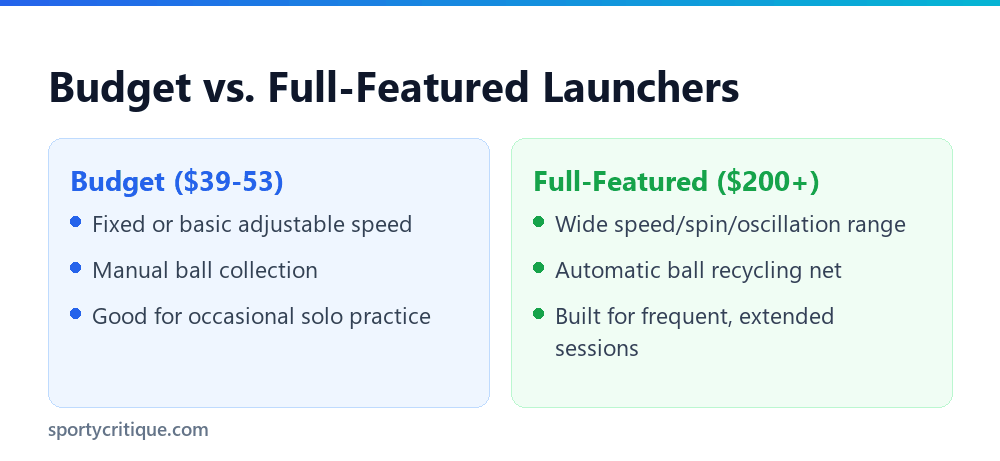
The real deciding factor isn’t brand, it’s how often you’ll actually use the machine. Occasional practice a couple of times a month doesn’t justify a $299 recycling-net setup — a $39-53 basic launcher covers that use case fine, and manually collecting balls every 15-20 minutes isn’t a big deal at that frequency. Regular, multiple-times-a-week solo training is where a recycling net earns its higher price, since constant manual ball collection becomes a genuine drag on session length and rhythm at that usage level.
Think of the budget tier as an honest trial: if you find yourself genuinely using a $39-53 launcher every week and wishing you didn’t have to stop and collect balls constantly, that’s a clear, practical signal you’re ready to justify the jump to a full-featured recycling setup like the Suz S201.
Setting Up and Getting the Most From a Launcher
Placement Matters More Than Settings
Most launchers mount at one end of the table and fire across the full length, so table space and clearance behind the launcher matter as much as the machine’s own settings. Leave enough room behind the unit for its ball hopper and any recycling net attachment, and make sure the table itself is on a level, stable surface — a launcher firing from an uneven table produces inconsistent placement that has nothing to do with the machine’s actual quality, and troubleshooting the wrong cause wastes time better spent training.
Start Slow, Then Increase Difficulty
Every launcher on this list offers some form of speed adjustment, and the temptation to start at a challenging setting works against actually building consistency. Begin at a slow, comfortable pace focused purely on clean, controlled returns, then increase speed and add oscillation only once that baseline feels genuinely automatic rather than something that still requires conscious, effortful concentration to execute reliably shot after shot in a row.
Oscillation Adds Realism, Not Just Difficulty
A launcher that only fires to one fixed spot builds a different skill than one with side-to-side oscillation — fixed placement is better for grooving a single specific stroke repeatedly, while oscillation better simulates the unpredictable placement of a real opponent. Both genuinely have a place in a well-rounded training routine depending on exactly what specific skill you’re actually working on during that particular session.
Basic Maintenance
Ball launchers are mechanically simple compared to a genuine return-hitting research robot, but a few basic maintenance habits keep them running consistently over time without any specialized tools or technical expertise required:
- Clean the ball-feeding mechanism periodically — dust and ball residue can affect feed consistency over extended use.
- Store balls separately from the unit when not in use, keeping the hopper mechanism clear rather than loaded long-term.
- Check power cables and connections before each session on corded models, since a loose connection is a common source of inconsistent firing.
- Keep the unit dry — even indoor use near open windows or humid environments can affect the internal motor over time.
Launcher, Robot, Machine: The Same Thing
Product listings use several names for this category more or less interchangeably, and the inconsistency makes comparison harder than it needs to be. Ball launcher, ping pong robot, table tennis robot, serving machine and ball machine all describe the same class of product: a device that feeds balls to you automatically.
There is no reliable convention distinguishing them. Some sellers use robot for higher-specification units with spin and oscillation and launcher for simpler throwers, but plenty of listings use the terms the other way round, so the name tells you very little about capability.
What does tell you is the feature list, capacity, feed rate range, spin control, oscillation, programmability, which is why those are the terms worth searching and comparing on rather than the product category name. We cover the same category from different angles across several guides, including our ping pong machine guide for the app-controlled tier and our robot guides by price bracket.
One genuine distinction is worth keeping straight, though, because it separates two different products rather than two names for one. A launcher feeds balls to you. A rebound board or return net sends your own shot back. Some cheap listings use robot language for the latter, and it is a materially different purchase.
What a Launcher Actually Changes About Practice
The case for a ball launcher is not that it replaces a partner. It is that it removes the two things that limit how much useful repetition you get: partner availability, and the fact that a rally stops every time either player misses.
In a normal rally between two club players, a large share of the session is spent retrieving balls, resetting, and waiting. A launcher feeding continuously produces several times the number of strokes in the same wall-clock time, and repetition is the mechanism by which technique becomes automatic.
The second benefit is consistency. A partner’s feed varies shot-to-shot, which is realistic but unhelpful when you are trying to isolate one stroke. A launcher delivers the same ball, at the same pace, to the same place, which is exactly the controlled condition needed to change a technical habit.
What it does not develop is the reading, anticipation and tactical adaptation that come from a live opponent. Launcher practice and match play are complements, not substitutes, and a player who only drills against a machine tends to have clean strokes and poor match instincts.
The Specifications That Actually Differentiate Machines
Launcher listings quote a lot of numbers, and only some of them change what you can practise. These are the ones worth comparing.
- Ball capacity. Determines how long you drill before reloading. Small hoppers holding a few dozen balls interrupt constantly; larger capacities, especially with a recycling net, allow genuinely uninterrupted sessions.
- Feed rate, usually balls per minute. A useful range matters more than a high maximum, since slow feeds suit technique work and fast feeds suit reaction training.
- Spin capability. The largest functional divide. Fixed-spin or no-spin machines drill stroke mechanics; variable-spin machines let you practise reading and adjusting, which is a different and more advanced skill.
- Oscillation. Whether the machine moves the ball across the table. Without it you cannot practise footwork meaningfully, which is the single biggest limitation of budget units.
- Programmability. Whether you can chain different shots into a drill sequence. This is what distinguishes premium machines and what makes match-realistic practice possible.
If you are comparing two machines and can only prioritise one feature, oscillation is usually the one that expands what you can practise most. A machine that varies placement lets you drill movement; one that only varies spin still has you standing in one spot.
The Three Tiers, and Who Each Suits
Ball launchers separate into fairly distinct tiers, and matching the tier to your actual training pattern matters more than comparing individual models across tiers.
- Entry (fixed feed, no oscillation, no spin control): a straightforward ball thrower. Genuinely useful for stroke grooving and warming up, and a real improvement over practising alone with no equipment. Suits beginners, casual players, and anyone testing whether solo drilling suits them.
- Mid (spin settings, some oscillation, often a recycling net): the tier where a launcher starts supporting varied, structured practice rather than repetition alone. Suits club players training regularly.
- Premium (full programmability, wide spin and placement range, app control): capable of drill sequences approximating a real opponent’s variety. Suits serious competitive training, and is genuinely overkill below that.
Two honest observations about buying across tiers. Players consistently underestimate how much the recycling net matters, it is often the difference between a machine used weekly and one used twice. And players consistently overestimate how much programmability they will use, since complex drill programming takes setup time that many never invest.
Deciding What to Buy
Reduced to a decision, the question is not which launcher is best but which capability you will actually use, and the honest answer for many buyers is less than they expect at the point of purchase.
- If you have never used one, an entry machine is a reasonable way to find out whether solo drilling suits you before committing more. Many players discover they enjoy it far more, or far less, than anticipated.
- If you already know you will drill regularly, buy at least into the tier with oscillation, because that is the feature that determines whether footwork practice is possible at all.
- If you are choosing between a better machine and a recycling net, take the net. A modest machine you can run continuously beats a capable machine you stop to reload every few minutes.
- If you are buying for a club or shared use, prioritise build quality and ease of setup over features, since shared equipment gets handled by people who did not read the manual.
One more piece of practical advice: check what the machine needs that is not in the box. Balls in quantity, a net or collection solution, and in some cases a mounting or clamping arrangement are all common additional purchases, and the realistic total is frequently well above the machine’s headline price.
Drills Worth Running
A launcher is only as valuable as what you do with it, and having a few structured drills ready beats deciding at the table. These scale across machine tiers, with notes on what each needs.
- Single-stroke grooving. Fixed feed, one placement, one stroke, high repetition. Works on any machine including the simplest, and is the highest-value drill for a developing player.
- Target accuracy. Same fixed feed, but aim at a marked target rather than simply returning. Turns repetition into measurable practice and reveals whether your stroke is actually controlled or merely consistent.
- Two-point footwork. Requires oscillation. Ball alternates between two placements and you move to play the same stroke from both. This is where footwork actually develops.
- Backspin-to-topspin transition. Requires spin control. Alternating incoming spin forces you to read and adjust rather than repeat, which is the bridge from drilling to match play.
- Third-ball simulation. Requires programmability. Serve yourself, let the machine feed the return, play the third ball. The closest a machine gets to rehearsing real patterns.
Progression matters more than variety. Running the same drill across several weeks and watching your target accuracy improve is worth considerably more than cycling through many drills once each, which feels productive and changes very little.
Setting Up for Useful Sessions
A launcher produces good practice only if it is set up deliberately, and the most common mistake is treating a session as hitting whatever the machine sends rather than working on something specific.
- Position it for a realistic trajectory. A machine placed too close or at the wrong height sends balls arriving unlike anything an opponent would produce, and you will groove adjustments you do not want.
- Set one objective per session block. Twenty minutes on one stroke beats an hour of unfocused hitting, because the value is in concentrated repetition.
- Start slower than match pace. Technique work needs time to execute the stroke correctly; speed work comes after the motion is right.
- Use targets. Placing a sheet of paper or a towel on the far side turns repetition into measurable practice and stops sessions drifting into mindless hitting.
Structure the session as you would a coached one: warm up on something comfortable, work on the specific thing you came to work on while you are fresh, then finish with something enjoyable. Drilling until you are too tired to execute correctly is actively counterproductive, since the last repetitions teach the wrong motion.
Building a Training Week Around One
Owning a launcher changes what a training week can look like, and having a rough structure prevents the common pattern where a machine gets heavy use for a fortnight and then sits unused in a corner for the rest of the year, which is by some distance the most common fate of a launcher bought without a plan for using it.
A workable shape for a club player training around three times a week, and one that survives contact with a normal schedule rather than assuming unlimited availability, is one machine session focused on a single technical objective, one session of live play at the club, and one mixed session that starts on the machine and finishes with games. That gives the technical work somewhere to go, which is what keeps it motivating rather than abstract, and it means every machine session has a visible purpose you can check against results later in the week.
The objective for each machine session should come from your matches. If you lost points to backspin openings going into the net, that is next session’s drill. Choosing objectives from actual match evidence rather than from what feels satisfying to hit is the difference between practice and merely hitting, and it is the single habit that most reliably separates players who improve with a machine from players who simply own one.
- Warm up for a few minutes on a comfortable stroke at a slow feed, treating it as preparation rather than as part of the session objective.
- Main block: twenty to thirty minutes on the session objective while you are fresh and concentrating.
- Secondary block: a shorter period on something different, to avoid over-grooving a single motion across one session and to keep the practice feeling varied enough to sustain.
- Finish with something enjoyable, since a session you actually look forward to repeating next week is worth a great deal more than a theoretically optimal one you quietly start avoiding.
Keep the sessions shorter than you think necessary. Concentrated thirty-minute blocks produce better technical change than two-hour sessions where the last hour reinforces a tiring, deteriorating stroke. If you finish a session still wanting another ten minutes, you have almost certainly got the length right, and you will come back to the machine sooner than if you had pushed through to exhaustion.
One last point that applies whatever structure you settle on: write down what you worked on. A short note after each session, naming the objective and how it went, turns a series of disconnected sessions into something you can actually review across a season, and it makes it obvious when a drill has stopped producing change and should be replaced with a harder one.
What a Launcher Will and Will Not Do For Your Game
Setting expectations honestly matters here, because launchers are marketed on transformation and bought on hope, and the actual effect is real but specific.
It will improve stroke consistency, and quickly, because consistency is a function of correct repetition and a machine supplies repetition at a volume rally play cannot. Players typically notice this first in their most-drilled stroke within a few weeks of regular use.
It will improve fitness and rhythm, since continuous feeding produces far more movement per session than stop-start rallying.
It will not improve your ability to read an opponent, disguise your own intentions, construct points, or handle competitive pressure. Those develop against people, and a player who drills extensively without playing matches often finds their improved technique does not convert into results as directly as expected.
The players who get most from a launcher treat it as one component of a training week rather than the whole of it, using it to fix specific technical faults identified in real matches, then taking the corrected stroke back into match play to see whether it holds under pressure.
Launcher Practice vs. a Training Partner
Worth being direct about the comparison, since a launcher is often bought as a substitute for a partner who is not available.
A launcher wins on availability, on repetition volume, and on consistency. It never gets tired, never misses, and never has to leave early, and for grooving technique those are decisive advantages that a human partner genuinely cannot match.
A partner wins on everything involving reading another player: anticipation, disguise, tactical adjustment, and the pressure of someone actively trying to beat you. Those are match skills, and no machine currently sold develops them.
The practical conclusion is that the two are complements. A sensible pattern for a club player is machine work for technical development between sessions, and club sessions for match play and the skills only an opponent produces. Players who substitute entirely in either direction tend to develop lopsided games, clean strokes with no match sense, or good instincts with unreliable technique.
Space and Setup Requirements
A launcher needs more room than the table alone, and this catches out buyers whose table is already tight in its space.
Behind the machine you need room for the unit itself, which sits at or beyond the far end of the table depending on design. Behind you, you need the normal playing clearance plus a little more, since drilling frequently has you further back than casual rallying does.
Vertical clearance matters for machines that lob or produce high trajectories, and floor space matters for a recycling net, which extends the footprint further. If your table is in a garage or a loft with restricted height, check the machine’s trajectory range before buying rather than after.
Power is the last consideration and the easiest to overlook. Mains-powered machines need an outlet within reach, and an extension lead running across the playing area is a genuine trip hazard during footwork drills. Battery-powered units avoid this entirely and are worth preferring if your table is somewhere without convenient power. Our minimum room size guide covers the underlying space requirements in more detail.
The Ball Collection Problem
Nobody buying their first launcher plans for this, and it is the single most common reason machines end up unused: a launcher firing sixty balls a minute empties a hopper fast, and every one of those balls is now on the floor.
A recycling net that returns balls to the machine is the complete solution, and it turns a launcher from a stop-start experience into continuous practice. Where a machine offers a version with a net and one without, the net version is very frequently worth the difference.
Where that is not an option, a catch net collects balls at the far end even without returning them, which at least concentrates the collection into one place rather than the whole hall. A ball picker makes the collection itself far quicker. Both are covered in our dedicated guides, and either is a cheaper fix than replacing the machine.
Buy plenty of balls as well. A hopper’s stated capacity is only useful if you own that many, and training balls bought in bulk are inexpensive. Running a large-capacity machine on three dozen balls wastes the capacity you paid for.
Keeping a Launcher Working
Ball launchers are relatively simple machines and last well with modest care, but they are hard on a small number of components and neglecting those shortens their life considerably.
The launch wheels do the work and take the wear. They accumulate dust and ball residue, which reduces grip and produces inconsistent launches long before the wheels are actually worn out. Wiping them periodically is the single highest-value maintenance habit, and it resolves a large share of the consistency complaints owners report.
The feed mechanism is the second area. Dust and ball fragments accumulate where balls are separated and released, and that is where jams originate. Keeping it clear, and keeping damaged balls out of the hopper in the first place, prevents most feed faults.
- Wipe launch wheels regularly, more often in dusty halls.
- Keep the hopper free of dust, chips and ball fragments.
- Discard damaged and out-of-round balls rather than recycling them through the machine.
- Store the machine covered or cased so dust does not settle inside between sessions.
- Check clamps and fixings periodically, since vibration loosens them over time.
Balls themselves are the consumable here, not the machine. A launcher is harder on balls than rally play is, and a training set will need replacing periodically. Budgeting for that from the start avoids the false economy of running a machine on a deteriorating set, which degrades both the practice and the machine’s reliability.
How Long These Machines Last
Ball launchers are mechanically simple, which works in their favour: there is not a great deal to fail, and the components that do wear are usually the ones you can clean or replace.
Launch wheels are the main wear item, and on a well-used machine they will eventually need replacing. Whether that is possible varies by manufacturer and is worth checking before buying, since a machine with available spare wheels has a considerably longer practical life than one where wheel wear means replacement.
Motors generally outlast the wheels comfortably in domestic use. Electronics are the least predictable component, particularly on app-controlled machines where a discontinued app can render features inaccessible even though the hardware still works, which is a real consideration at the premium end and an argument for machines with usable physical controls as well as app control.
For a machine used a few times a week by one player, several years of service is a reasonable expectation from a well-built unit. Club use, with many more hours and multiple operators, is considerably harder on equipment, which is why build quality deserves more weight than features in a shared-purchase decision.
When a Launcher Misbehaves
Most launcher faults are one of a handful of problems, and nearly all are fixable without a repair.
- Balls jamming in the feed. Usually damaged or dirty balls rather than a machine fault. Dented and out-of-round balls are the most common cause; discard them rather than feeding them back in.
- Inconsistent launch speed. Often worn or dusty wheels losing grip on the ball. Cleaning the wheels restores consistency more often than any adjustment.
- Two balls fed at once. A feed mechanism issue, commonly caused by mixing ball sizes or including a ball that is slightly out of spec.
- The machine walking across the table. Vibration plus insufficient clamping. Clamp it properly rather than resting it, and check the clamp between sessions.
- Placement drifting during a session. Usually the same clamping problem, or the surface it sits on flexing.
A general prevention point: use good, undamaged balls. More launcher problems trace back to poor balls than to any other single cause, and since machines are hard on balls, keeping a dedicated training set and discarding damaged ones promptly saves a great deal of frustration.
Questions Buyers Actually Ask
Can I use a launcher on any table? Generally yes. Most units either clamp to the table edge or stand on it, and the constraints are the same edge-thickness and clearance issues that affect catch nets. Compact tables work fine, though a shorter table gives a shorter ball flight and a less match-realistic trajectory.
How many balls do I need? More than most people buy. A hopper’s capacity is only usable if you own that many, and with a recycling net you want enough in circulation that the machine never runs dry mid-drill. Training balls in bulk are inexpensive and are the cheapest way to improve a launcher session.
Do I need 3-star balls? No, and it is usually the wrong choice. Machines are hard on balls and you will get through them, so training-grade balls are the sensible economy. Consistency within the set matters more than the star rating on it, so avoid mixing grades in one hopper.
Will it work for a complete beginner? Yes, and arguably better than for an advanced player, since beginners benefit most from high-volume repetition of a simple stroke. Set the feed slow and work on one thing.
Is a launcher worth it if I already have a regular partner? Often still yes, because the two develop different things. If your partner sessions are already fully booked with match play, a machine adds technical work that would otherwise displace it.
Frequently Asked Questions
What are the actual best ping pong ball launchers to buy?
The Suz S201 is the best full-featured option with its recycling net and 200 balls, while JOOLA’s iPong Play and the Suz S101 are both solid budget entries under $40 for occasional solo practice.
How does the iPong Play trainer work?
It’s a motorized ball launcher that fires balls at adjustable speed and spin for you to practice returning — it doesn’t track or react to your return shots, the same mechanism every launcher on this list uses.
Is the Suz S102 genuinely suitable for beginners?
Yes — its wireless remote makes adjusting settings simple even without prior experience, and its price sits in the accessible budget range alongside the iPong and S101.
What balls are actually compatible with these launchers?
Standard 40mm regulation balls work with every launcher on this list, though the included balls that ship with each machine are sufficient to get started without an additional purchase.
Does the Suz S201 come with a net?
Yes — a recycling net that catches returned balls and feeds them back into the machine automatically, the main feature differentiating it from the three budget picks above.
Can I actually use a launcher without a partner or coach present?
Yes — that’s the primary use case for every product on this list. A ball launcher is specifically designed for solo practice, letting you drill strokes and footwork without needing another person available.
Do I really need a recycling net, or can I just collect balls manually?
Manual collection works fine for shorter or less frequent sessions — it’s really a question of how much time you want to spend picking up balls versus training. A recycling net pays for itself in convenience once you’re training multiple times a week for extended sessions.
How long do these launchers typically last with regular use?
With basic care, most launchers in this price range last several years of regular use. The motor and feeding mechanism are the parts most likely to eventually wear out, which is why the maintenance habits above genuinely extend a unit’s working lifespan well beyond what neglect would otherwise produce.
Can a launcher fully replace practicing with a real training partner?
Not entirely — a launcher is excellent for repetitive, focused stroke drilling, but it can’t replicate the unpredictable placement, spin variety, and tactical decision-making a live opponent brings to a real rally. Most serious players use a launcher to supplement partner practice, not replace it.
Is a more expensive launcher always the objectively better choice?
Not necessarily for every player — a $299 machine with a recycling net is genuinely wasted on someone who plays recreationally once or twice a month, since they’ll rarely use the features that justify the higher price. Match the machine to your actual training frequency rather than assuming more expensive automatically means more suitable.
As an Amazon Associate, we earn from qualifying purchases through links on this page.

Ping Pong Reviewed is an equipment review site covering table tennis and baseball gear. Specifications are checked against manufacturer listings, and prices against live retail pages, before publication.