Best Ping Pong Robots Under $400 (2026 Picks)
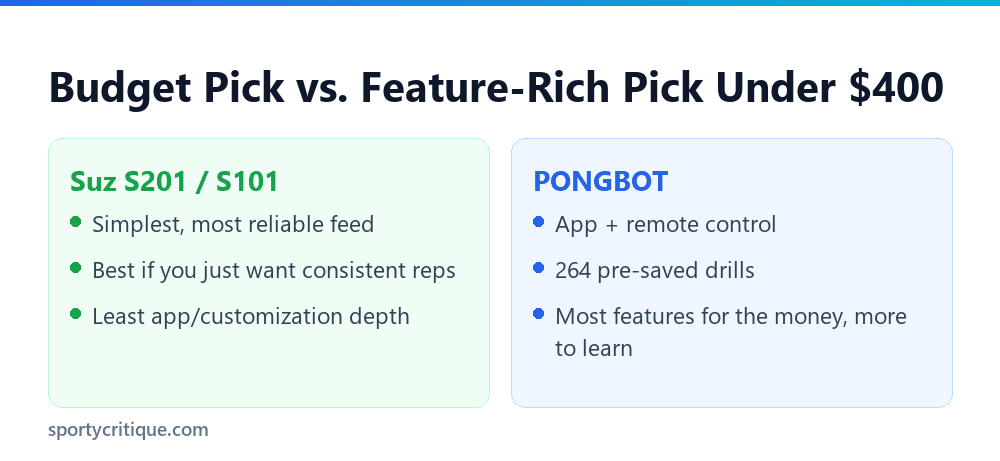
The best ping pong robot for $400 or less depends on what you actually want out of it. For straightforward, reliable reps, the Suz S201 is the simplest choice. For the most features per dollar, the PONGBOT packs remote/app control and 264 preset drills into the same budget.
- →Five real robots fit comfortably under $400: two Suz models, the ZXMOTO, the iPong V300, and the PONGBOT — each with a different strength.
- →The PONGBOT offers the most customization (spin, frequency, speed, 264 drills) of any robot in this price range.
- →The iPong V300 is the lightest and simplest at just over 3 pounds, built purely for solo serve practice rather than full rally simulation.
- →The two Suz models (S201 and S101) are nearly identical — the main difference is a catch net included with the S201.
Under $400 buys a genuinely capable training robot today, not a stripped-down compromise. The five models below all deliver automatic ball feeding with some level of spin and speed control — the real differences come down to how much you can customize and how much complexity you actually want to deal with.
Table of Contents
Most Reliable: Suz S201 (With Net)

The Suz S201 bundles a catch net with the robot itself, which matters more than it sounds — without one, you spend as much time chasing stray balls as actually training. At about 21.6 pounds, it’s on the heavier side of this list, but that weight buys stability during continuous feeding sessions. It comes with 40mm+ regulation balls included, so it’s ready to use straight out of the box.
- ✓Includes a catch net — no chasing balls across the room
- ✓Automatic, consistent feeding for solo sessions
- ✓Comes with regulation balls included
- ✕Heavier than the other models here
- ✕Priced toward the top of this budget range
Most Spin Variety: ZXMOTO

The ZXMOTO leads this list on raw spin variety, delivering 36 different spin types from one compact, lightweight unit. That range is genuinely useful for players working on returning unfamiliar spin, though it does mean more setup fiddling to dial in the exact type you want for a given drill compared to the simpler Suz models.
Lightest and Simplest: iPong V300

The iPong V300 weighs just 3.08 pounds, dramatically lighter than everything else on this list. It’s built specifically for solo serve practice rather than full rally simulation, serving regulation 40mm balls automatically with adjustable settings. That narrower focus is exactly why it’s the easiest of the five to learn and the most portable to travel with.
💡 Pro tip: If storage space or portability matters more to you than raw feature count, the iPong V300’s weight difference from the rest of this list is dramatic enough to be the deciding factor on its own.
Most Customizable: PONGBOT

The PONGBOT is the feature leader in this price range, controlled by remote or app with 264 pre-saved training drills and independent adjustment of spin, frequency, ball speed, rotation intensity, and landing height. That depth is genuinely valuable for a player who wants to structure a real practice plan, but it also means a real learning curve before you’re using the app efficiently, and it needs more regular maintenance than the simpler models here.
Simplest Budget Option: Suz S101 (No Net)

The Suz S101 is essentially the S201 without the bundled catch net, at a correspondingly lower price. If you already have a net or don’t mind retrieving balls yourself, the S101 delivers the same automatic feeding and adjustable settings as its sibling for less money. It’s the most literal budget pick among the five.
Which Ping Pong Robot Under $400 Should You Actually Buy?
If you’re not sure where to start, the Suz S201 is the safest pick — reliable feeding, a bundled net, and regulation balls included, with nothing extra to learn. Players who already know they want structured, varied drills should spend the same budget on the PONGBOT instead, since the 264 preset drills and full spin/speed customization deliver more long-term training value once you’re past the learning curve. The iPong V300 is worth a look specifically if portability or a tight storage space is the deciding factor.
How This List Differs From Our Serving Machine Guide
Our separate guide to the best ping pong serving machines covers a wider set of 10 models across a broader price range, focused specifically on solo serve practice. This list is narrower on purpose: five models that all fit comfortably under a $400 budget, compared against each other rather than ranked against pricier options. Read both if budget isn’t your primary constraint and you want the full field, or start here first if $400 is a hard ceiling and comparing within that range directly matters more than scrolling past pricier options you can’t actually consider buying.
Are These Robots Worth It Compared to a Training Partner?
A ping pong robot under $400 won’t replicate everything a human opponent brings — reading a real player’s body language, adjusting to genuine tactical pressure, or the simple motivation of playing against someone. What it does deliver is unlimited, consistent repetition on your own schedule, which is exactly what most players actually need more of. Fixing a specific stroke flaw usually takes hundreds of repeated reps, and a training partner rarely has the patience or time to feed the same shot over and over the way a robot will without complaint.
Noise Level Considerations
All five robots here run on electric motors that produce a low, steady hum during operation, noticeable but not loud enough to disturb conversation in the same room. The PONGBOT’s more complex mechanism runs marginally louder than the simpler Suz and ZXMOTO units, though the difference is small enough that noise shouldn’t be a deciding factor between these five specifically. Playing in an apartment or shared space during late hours is still worth a quick check with neighbors regardless of which model you pick.
Ball Speed and Frequency Range
Adjustable ball speed and feed frequency separate a real training robot from a toy. The PONGBOT offers the widest adjustable range of the five, letting you dial frequency down for technique work or up for reflex and conditioning drills. The Suz models and ZXMOTO offer a narrower but still genuinely useful adjustable range, enough for most recreational and club-level training needs without the added complexity of the PONGBOT’s full customization suite.
Setup and Space Requirements
All five robots here need a full-size table and enough clear space behind it to catch or collect balls — figure at least a few feet of clearance beyond the table’s edge. The two Suz models and the ZXMOTO set up in a few minutes with no tools required beyond attaching the robot to the table edge. The PONGBOT’s app pairing takes a bit longer the first time, but subsequent sessions start just as fast as the simpler models once it’s paired.
What You Give Up Compared to Robots Over $400
Spending more than $400 typically buys a wider oscillation range (side-to-side ball placement rather than a fixed feed point), a larger ball hopper, or Bluetooth app control layered onto more sensors. None of the five robots here oscillate — they feed from a fixed position, which is the single biggest functional gap between this price range and the $500-plus tier. For players focused on stroke repetition rather than footwork drills that require ball placement variety, that gap matters less than the price difference would suggest.
Who Should Skip a Robot Entirely at This Budget
A robot under $400 isn’t the right purchase for everyone at this price point. Complete beginners are often better served spending that same budget on a handful of coaching sessions first, since a robot reinforces whatever technique you already have, right or wrong, rather than correcting it. Players who already have a regular practice partner and mainly want match play, not solo repetition drills, will also get more value putting the same $400 toward a better table, paddle, or rubber upgrade instead.
Maintenance and Ball Capacity
Ball hopper capacity varies enough between these models to matter for longer sessions. Robots with smaller hoppers, like the iPong V300, need more frequent refilling during an extended practice block, which briefly interrupts the flow of a session. The PONGBOT’s more complex mechanism also needs more regular maintenance than the simpler feed mechanisms in the Suz and ZXMOTO models, a real tradeoff for the extra customization it offers.
Long-Term Value at This Price Point
🛒 Frequently Bought Together: Complete Paddle Match & Care Kit
When ordering table tennis equipment, tournament competitors frequently bundle protection and maintenance gear in the same Amazon shipment to maintain equipment tack and avoid separate delivery fees:
Selected Tournament Paddle
Your chosen offensive or all-around competition racket
Deluxe Padded Racket Case with Ball Storage
Shockproof zip case with foam protection to prevent chipped edges
Rubber Cleaning Foam Spray & Rejuvenating Sponge
Restores surface tack, dissolves sweat grease, and doubles rubber life
A robot under $400 pays for itself fastest for players training multiple times a week, where the cost per session drops quickly compared to paying for court time or a hitting partner. Casual players who’ll use it once or twice a month get less value per dollar, though even occasional structured reps beat none at all for maintaining consistent stroke mechanics between less frequent matches. Think about how often you’ll realistically use it before committing to any of these five, since that usage frequency matters more to long-term value than which specific model you pick.
What is the best ping pong robot under $400?
The Suz S201 is the most reliable all-around pick under $400, while the PONGBOT offers the most features and customization for a similar price.
Do these robots come with balls included?
The Suz S201 and S101 both include 40mm+ regulation balls; check the listing for the other models, since inclusion varies.
Which robot under $400 has the most spin variety?
The ZXMOTO leads this group with 36 different spin types from one compact unit.
Is the PONGBOT worth the learning curve?
Yes, if you want structured, varied training — its 264 preset drills and full spin/speed customization deliver more long-term value once you’re past the initial setup.
What’s the difference between the Suz S201 and S101?
The S201 includes a bundled catch net; the S101 doesn’t, and costs correspondingly less for otherwise similar automatic feeding.
Do any of these robots oscillate side to side?
No — all five feed from a fixed position rather than oscillating, which is the main functional gap between this price range and robots over $400.
How often should I use a robot for it to be worth the price?
Multiple sessions per week gets the best value per dollar, though even occasional use beats no structured repetition between matches.
As an Amazon Associate, we earn from qualifying purchases through links on this page.

Ping Pong Reviewed is an equipment review site covering table tennis and baseball gear. Specifications are checked against manufacturer listings, and prices against live retail pages, before publication.